
GGPanalo Philippines Deposit and Withdrawal Guide
Managing your funds on GGPanalo is simple and hassle-free, whether you’re using the official website, mobile version, or the app. GGPanalo offers a smooth experience for Filipino players with a wide range of secure payment methods tailored for the Philippines. Whether you’re depositing money into your account or cashing out your winnings, the process is seamless and convenient in pesos.
GGPanalo Deposit Methods
Our deposit options are flexible to suit your needs. You can use Maya, online banking, and popular e-wallets like GCash. Every deposit is processed quickly, and your account can be funded directly in pesos. If you need assistance, visit our Frequently Asked Questions page or reach out to our friendly customer support team.
How to Deposit on GGPanalo Casino
Step 1:
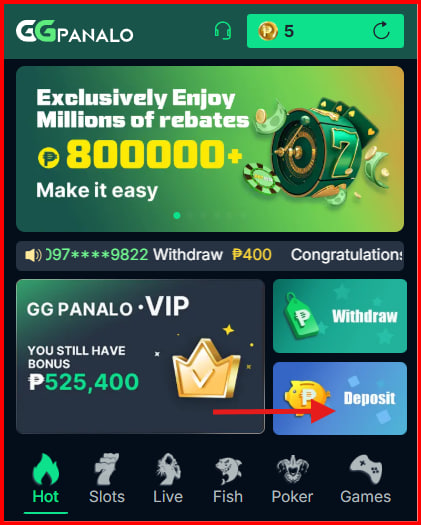
Click the “Deposit” button on the GGPanalo homepage to open your wallet.
Step 2:
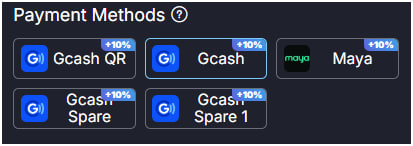
Choose your preferred deposit method. Options include GCash and Maya.
Step 3:
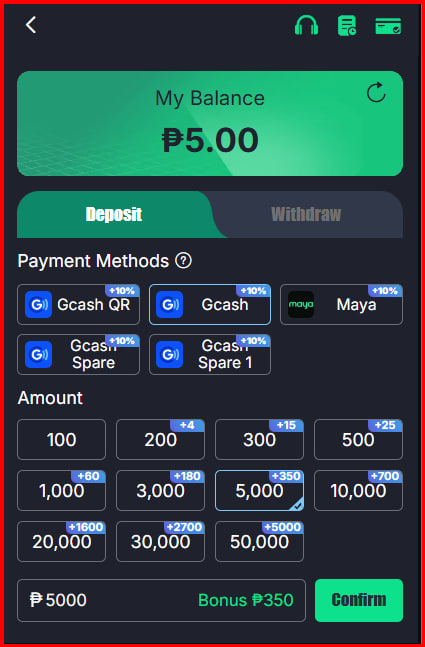
Enter the deposit amount (between ₱100 and ₱50,000). You may choose to join a deposit promotion or skip it.
Step 4:
Review your deposit details. Once everything looks correct, click “Confirm” to finalize your transaction.
GGPanalo Withdrawal
Withdrawing your winnings is quick and hassle-free. You can use major e-wallets like GCash and Maya, starting from a minimum of ₱100. Most e-wallet withdrawals are processed instantly, so you can receive your funds within minutes.
How to Withdraw from GGPanalo Casino
Step 1:
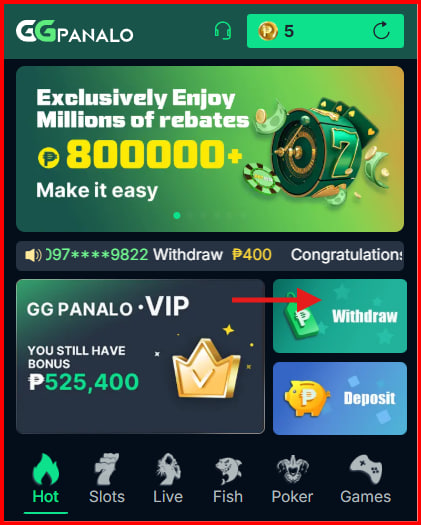
Click the “Withdraw” on the homepage to access your wallet.
Step 2:
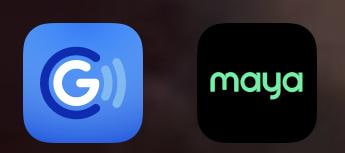
Ensure your account information is accurate. Then select your preferred withdrawal method, such as GCash or Maya.
Step 3:
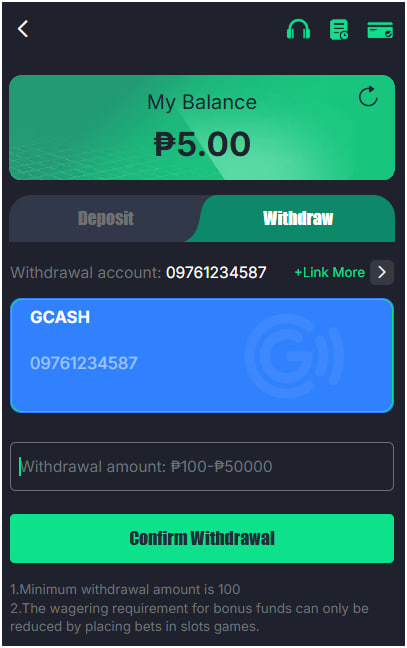
Enter the amount you want to withdraw (minimum ₱100). Carefully review your details before confirming.
Step 4:
Submit your withdrawal request. GGPanalo will start processing immediately. Most e-wallets like GCash and Maya transfer funds within minutes.
Step 5:
Once processed, the funds will be sent to your selected payment method. Remember, the first three withdrawals per day are free, while additional withdrawals may have a small fee.
Important Notes:
- The minimum withdrawal amount is ₱100.
- Bonus funds can only contribute toward the wagering requirement when you place bets on slot games.
Common Issues with Deposits and Withdrawals on GGPanalo
Incorrect Account Information
Ensure your name, contact number, and account details are correct. Errors may delay your transactions.
Payment Method Issues
If your preferred payment option isn’t available or isn’t working, confirm whether GGPanalo supports it and check if your payment information needs updating.
Deposit/Withdrawal Limits
Make sure your transaction amount meets GGPanalo’s limits. Deposits must be between ₱100–₱50,000, and withdrawals must be ₱100 or more.
Bank or E-wallet Processing Delays
Some methods, especially bank transfers, may take longer. E-wallets like GCash and Maya are usually quicker, while banks may take 24–48 hours or more.
Connection or Network Problems
Unstable internet may cause transaction errors. Switching to a stronger network often resolves the issue.
Transaction Fees
Your first three withdrawals per day are free. Additional withdrawals may include small fees depending on your chosen payment method.
Failed Transactions
Sometimes deposits or withdrawals may fail due to provider issues or system errors. If this happens, reach out to GGPanalo’s customer support team for assistance.
Conclusion
Depositing and withdrawing money on GGPanalo is fast and convenient, with a variety of secure payment methods available. Ensure your account information is accurate and follow the steps carefully to avoid delays. Always take note of transaction limits, processing times, and possible fees. If you encounter any concerns, GGPanalo’s support team is ready to help. Enjoy smooth and easy transactions as you play your favorite games!
FAQ
What is the minimum deposit amount on GGPanalo?
The minimum deposit is ₱100, and you can choose from payment methods like GCash, Maya, GrabPay, and more.
What is the minimum withdrawal amount?
The minimum withdrawal is ₱100. Make sure your account details are correct before submitting a withdrawal request.
Are there any fees for withdrawing from GGPanalo?
Your first three withdrawals each day are free. Additional withdrawals may include a small fee depending on the payment method used.
GGPanalo Philippines Deposit and Withdrawal Guide
Managing your funds on GGPanalo is simple and hassle-free, whether you’re using the official website, mobile version, or the app. GGPanalo offers a smooth experience for Filipino players with a wide range of secure payment methods tailored for the Philippines. Whether you’re depositing money into your account or cashing out your winnings, the process is seamless and convenient in pesos.
GGPanalo Deposit Methods
Our deposit options are flexible to suit your needs. You can use Maya, online banking, and popular e-wallets like GCash. Every deposit is processed quickly, and your account can be funded directly in pesos. If you need assistance, visit our Frequently Asked Questions page or reach out to our friendly customer support team.
How to Deposit on GGPanalo Casino
Step 1:
Click the “Deposit” button on the GGPanalo homepage to open your wallet.
Step 2:
Choose your preferred deposit method. Options include GCash and Maya.
Step 3:
Enter the deposit amount (between ₱100 and ₱50,000). You may choose to join a deposit promotion or skip it.
Step 4:
Review your deposit details. Once everything looks correct, click “Confirm” to finalize your transaction.
GGPanalo Withdrawal
Withdrawing your winnings is quick and hassle-free. You can use major e-wallets like GCash and Maya, starting from a minimum of ₱100. Most e-wallet withdrawals are processed instantly, so you can receive your funds within minutes.
How to Withdraw from GGPanalo Casino
Step 1:
Click the “Withdraw” on the homepage to access your wallet.
Step 2:
Ensure your account information is accurate. Then select your preferred withdrawal method, such as GCash or Maya.
Step 3:
Enter the amount you want to withdraw (minimum ₱100). Carefully review your details before confirming.
Step 4:
Submit your withdrawal request. GGPanalo will start processing immediately. Most e-wallets like GCash and Maya transfer funds within minutes.
Step 5:
Once processed, the funds will be sent to your selected payment method. Remember, the first three withdrawals per day are free, while additional withdrawals may have a small fee.
Important Notes:
- The minimum withdrawal amount is ₱100.
- Bonus funds can only contribute toward the wagering requirement when you place bets on slot games.
Common Issues with Deposits and Withdrawals on GGPanalo
Incorrect Account Information
Ensure your name, contact number, and account details are correct. Errors may delay your transactions.
Payment Method Issues
If your preferred payment option isn’t available or isn’t working, confirm whether GGPanalo supports it and check if your payment information needs updating.
Deposit/Withdrawal Limits
Make sure your transaction amount meets GGPanalo’s limits. Deposits must be between ₱100–₱50,000, and withdrawals must be ₱100 or more.
Bank or E-wallet Processing Delays
Some methods, especially bank transfers, may take longer. E-wallets like GCash and Maya are usually quicker, while banks may take 24–48 hours or more.
Connection or Network Problems
Unstable internet may cause transaction errors. Switching to a stronger network often resolves the issue.
Transaction Fees
Your first three withdrawals per day are free. Additional withdrawals may include small fees depending on your chosen payment method.
Failed Transactions
Sometimes deposits or withdrawals may fail due to provider issues or system errors. If this happens, reach out to GGPanalo’s customer support team for assistance.
Conclusion
Depositing and withdrawing money on GGPanalo is fast and convenient, with a variety of secure payment methods available. Ensure your account information is accurate and follow the steps carefully to avoid delays. Always take note of transaction limits, processing times, and possible fees. If you encounter any concerns, GGPanalo’s support team is ready to help. Enjoy smooth and easy transactions as you play your favorite games!
FAQ
What is the minimum deposit amount on GGPanalo?
The minimum deposit is ₱100, and you can choose from payment methods like GCash, Maya, GrabPay, and more.
What is the minimum withdrawal amount?
The minimum withdrawal is ₱100. Make sure your account details are correct before submitting a withdrawal request.
Are there any fees for withdrawing from GGPanalo?
Your first three withdrawals each day are free. Additional withdrawals may include a small fee depending on the payment method used.
GGPanalo Philippines Deposit and Withdrawal Guide
Managing your funds on GGPanalo is simple and hassle-free, whether you’re using the official website, mobile version, or the app. GGPanalo offers a smooth experience for Filipino players with a wide range of secure payment methods tailored for the Philippines. Whether you’re depositing money into your account or cashing out your winnings, the process is seamless and convenient in pesos.
GGPanalo Deposit Methods
Our deposit options are flexible to suit your needs. You can use Maya, online banking, and popular e-wallets like GCash. Every deposit is processed quickly, and your account can be funded directly in pesos. If you need assistance, visit our Frequently Asked Questions page or reach out to our friendly customer support team.
How to Deposit on GGPanalo Casino
Step 1:
Click the “Deposit” button on the GGPanalo homepage to open your wallet.
Step 2:
Choose your preferred deposit method. Options include GCash and Maya.
Step 3:
Enter the deposit amount (between ₱100 and ₱50,000). You may choose to join a deposit promotion or skip it.
Step 4:
Review your deposit details. Once everything looks correct, click “Confirm” to finalize your transaction.
GGPanalo Withdrawal
Withdrawing your winnings is quick and hassle-free. You can use major e-wallets like GCash and Maya, starting from a minimum of ₱100. Most e-wallet withdrawals are processed instantly, so you can receive your funds within minutes.
How to Withdraw from GGPanalo Casino
Step 1:
Click the “Withdraw” on the homepage to access your wallet.
Step 2:
Ensure your account information is accurate. Then select your preferred withdrawal method, such as GCash or Maya.
Step 3:
Enter the amount you want to withdraw (minimum ₱100). Carefully review your details before confirming.
Step 4:
Submit your withdrawal request. GGPanalo will start processing immediately. Most e-wallets like GCash and Maya transfer funds within minutes.
Step 5:
Once processed, the funds will be sent to your selected payment method. Remember, the first three withdrawals per day are free, while additional withdrawals may have a small fee.
Important Notes:
- The minimum withdrawal amount is ₱100.
- Bonus funds can only contribute toward the wagering requirement when you place bets on slot games.
Common Issues with Deposits and Withdrawals on GGPanalo
Incorrect Account Information
Ensure your name, contact number, and account details are correct. Errors may delay your transactions.
Payment Method Issues
If your preferred payment option isn’t available or isn’t working, confirm whether GGPanalo supports it and check if your payment information needs updating.
Deposit/Withdrawal Limits
Make sure your transaction amount meets GGPanalo’s limits. Deposits must be between ₱100–₱50,000, and withdrawals must be ₱100 or more.
Bank or E-wallet Processing Delays
Some methods, especially bank transfers, may take longer. E-wallets like GCash and Maya are usually quicker, while banks may take 24–48 hours or more.
Connection or Network Problems
Unstable internet may cause transaction errors. Switching to a stronger network often resolves the issue.
Transaction Fees
Your first three withdrawals per day are free. Additional withdrawals may include small fees depending on your chosen payment method.
Failed Transactions
Sometimes deposits or withdrawals may fail due to provider issues or system errors. If this happens, reach out to GGPanalo’s customer support team for assistance.
Conclusion
Depositing and withdrawing money on GGPanalo is fast and convenient, with a variety of secure payment methods available. Ensure your account information is accurate and follow the steps carefully to avoid delays. Always take note of transaction limits, processing times, and possible fees. If you encounter any concerns, GGPanalo’s support team is ready to help. Enjoy smooth and easy transactions as you play your favorite games!
FAQ
What is the minimum deposit amount on GGPanalo?
The minimum deposit is ₱100, and you can choose from payment methods like GCash, Maya, GrabPay, and more.
What is the minimum withdrawal amount?
The minimum withdrawal is ₱100. Make sure your account details are correct before submitting a withdrawal request.
Are there any fees for withdrawing from GGPanalo?
Your first three withdrawals each day are free. Additional withdrawals may include a small fee depending on the payment method used.
GGPanalo Philippines Deposit and Withdrawal Guide
Managing your funds on GGPanalo is simple and hassle-free, whether you’re using the official website, mobile version, or the app. GGPanalo offers a smooth experience for Filipino players with a wide range of secure payment methods tailored for the Philippines. Whether you’re depositing money into your account or cashing out your winnings, the process is seamless and convenient in pesos.
GGPanalo Deposit Methods
Our deposit options are flexible to suit your needs. You can use Maya, online banking, and popular e-wallets like GCash. Every deposit is processed quickly, and your account can be funded directly in pesos. If you need assistance, visit our Frequently Asked Questions page or reach out to our friendly customer support team.
How to Deposit on GGPanalo Casino
Step 1:
Click the “Deposit” button on the GGPanalo homepage to open your wallet.
Step 2:
Choose your preferred deposit method. Options include GCash and Maya.
Step 3:
Enter the deposit amount (between ₱100 and ₱50,000). You may choose to join a deposit promotion or skip it.
Step 4:
Review your deposit details. Once everything looks correct, click “Confirm” to finalize your transaction.
GGPanalo Withdrawal
Withdrawing your winnings is quick and hassle-free. You can use major e-wallets like GCash and Maya, starting from a minimum of ₱100. Most e-wallet withdrawals are processed instantly, so you can receive your funds within minutes.
How to Withdraw from GGPanalo Casino
Step 1:
Click the “Withdraw” on the homepage to access your wallet.
Step 2:
Ensure your account information is accurate. Then select your preferred withdrawal method, such as GCash or Maya.
Step 3:
Enter the amount you want to withdraw (minimum ₱100). Carefully review your details before confirming.
Step 4:
Submit your withdrawal request. GGPanalo will start processing immediately. Most e-wallets like GCash and Maya transfer funds within minutes.
Step 5:
Once processed, the funds will be sent to your selected payment method. Remember, the first three withdrawals per day are free, while additional withdrawals may have a small fee.
Important Notes:
- The minimum withdrawal amount is ₱100.
- Bonus funds can only contribute toward the wagering requirement when you place bets on slot games.
Common Issues with Deposits and Withdrawals on GGPanalo
Incorrect Account Information
Ensure your name, contact number, and account details are correct. Errors may delay your transactions.
Payment Method Issues
If your preferred payment option isn’t available or isn’t working, confirm whether GGPanalo supports it and check if your payment information needs updating.
Deposit/Withdrawal Limits
Make sure your transaction amount meets GGPanalo’s limits. Deposits must be between ₱100–₱50,000, and withdrawals must be ₱100 or more.
Bank or E-wallet Processing Delays
Some methods, especially bank transfers, may take longer. E-wallets like GCash and Maya are usually quicker, while banks may take 24–48 hours or more.
Connection or Network Problems
Unstable internet may cause transaction errors. Switching to a stronger network often resolves the issue.
Transaction Fees
Your first three withdrawals per day are free. Additional withdrawals may include small fees depending on your chosen payment method.
Failed Transactions
Sometimes deposits or withdrawals may fail due to provider issues or system errors. If this happens, reach out to GGPanalo’s customer support team for assistance.
Conclusion
Depositing and withdrawing money on GGPanalo is fast and convenient, with a variety of secure payment methods available. Ensure your account information is accurate and follow the steps carefully to avoid delays. Always take note of transaction limits, processing times, and possible fees. If you encounter any concerns, GGPanalo’s support team is ready to help. Enjoy smooth and easy transactions as you play your favorite games!
FAQ
What is the minimum deposit amount on GGPanalo?
The minimum deposit is ₱100, and you can choose from payment methods like GCash, Maya, GrabPay, and more.
What is the minimum withdrawal amount?
The minimum withdrawal is ₱100. Make sure your account details are correct before submitting a withdrawal request.
Are there any fees for withdrawing from GGPanalo?
Your first three withdrawals each day are free. Additional withdrawals may include a small fee depending on the payment method used.